Windows · macOS · Linuxversion 1.10.0

Every database you use.
One window.

MySQL, PostgreSQL, SQL Server, MongoDB, Redis and five more in the same app. Lightweight, quick to open, and it never asks you to sign up.

Free · no account · no telemetry

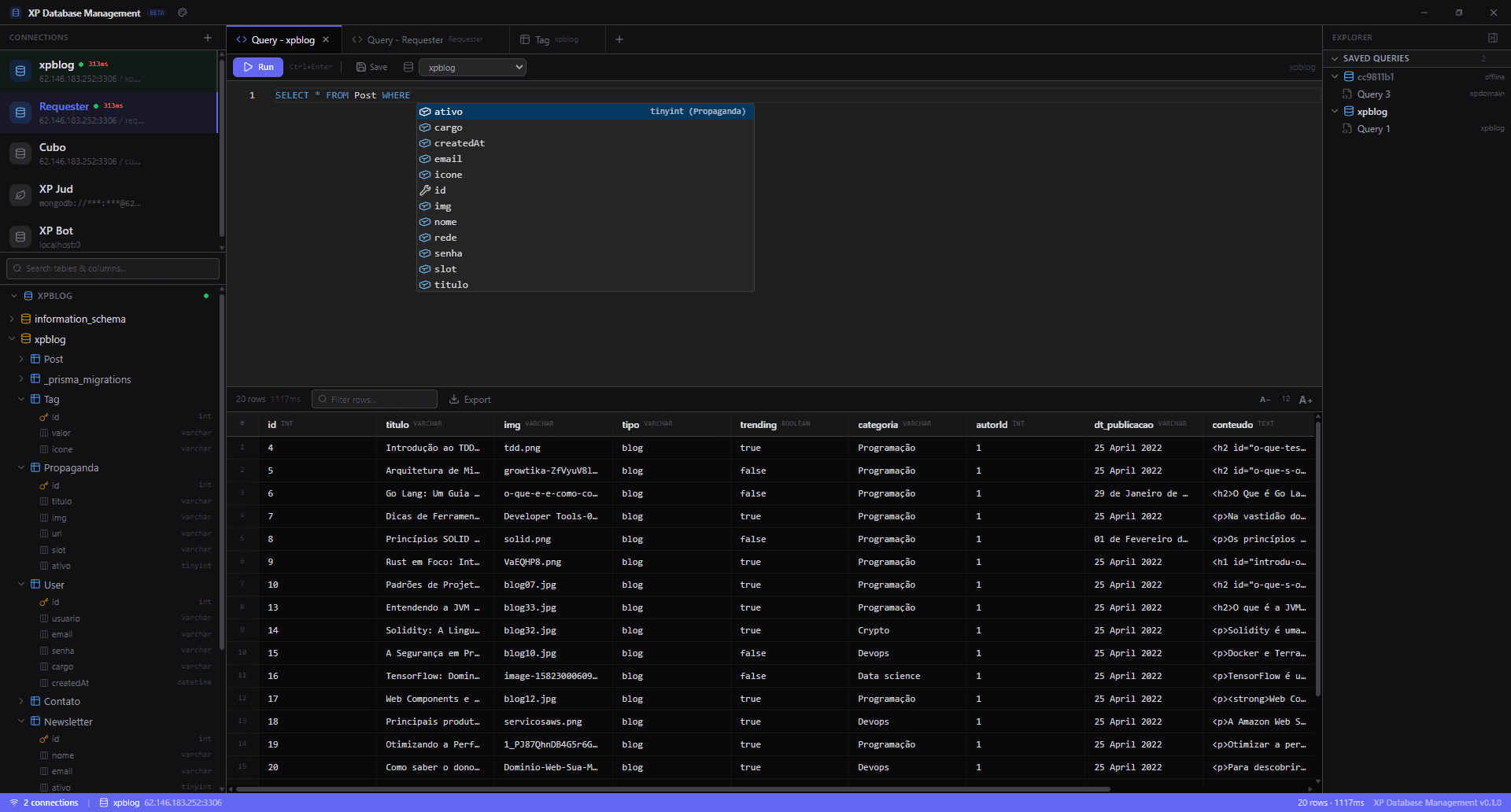
XP Database with a query open, column autocomplete and the results table
  1. Several connections openEach one shows its status and latency in the sidebar.
  2. Autocomplete that worksSuggests the columns of the table you are querying.
  3. Results you can work withFilter, sort, edit or export without leaving the screen.
Windows installer
15 MB
supported databases
10
operating systems
3
accounts, ads or tracking
0

Supported databases

Speaks each database's language.

Every database gets its own driver, written in Rust. No generic adapter pretending Redis is a SQL table.

Relational

  • PostgreSQLSchemas, views, functions and JSONB
  • MySQLTables, indexes and direct editing
  • MariaDBSame experience as MySQL
  • SQL ServerT-SQL with schemas and native types
  • SQLiteOpen the .db file and go

Distributed

  • CockroachDBPostgres wire protocol
  • TiDBMySQL wire protocol

NoSQL

  • MongoDBmongosh-style shell and document view
  • RedisBrowse keys and run commands
  • DynamoDBTables, items and PartiQL queries

Day to day

The things you do all day, without the friction.

01

An editor that knows your schema

The editor runs on the same engine as VS Code. It reads the structure of the connected database and suggests tables and columns as you type. Ctrl+Enter runs the query.

  • Multiple tabs, each with its own connection
  • Saved queries and history
  • A warning before risky statements
02

Edit data like a spreadsheet

Double-click a cell to edit it. JSON fields and long text open in their own editor. Nothing is written until you confirm.

  • Filter and sort by column
  • Export to CSV and JSON
  • Column types right in the header
03

Change the structure without memorizing DDL

Create, rename and alter tables through a form. When you inherit a database you didn't design, the ER diagram shows how the tables connect.

  • Create and edit tables and columns
  • ER diagram built from foreign keys
  • Tree with tables, views and functions
04

NoSQL without the hacks

In MongoDB you write like you would in mongosh. In Redis you run commands directly. In DynamoDB you use PartiQL. Each with its own syntax, in the same app.

  • Documents as a tree or a table
  • Switch databases with use <db>
  • The same shortcuts everywhere

Safety

For anyone who has run a DELETE without a WHERE.

Or is afraid to. XP Database checks the query before running it and stops when something looks wrong.

  • A check before the damageDROP, TRUNCATE, and DELETE or UPDATE without WHERE ask for confirmation.
  • Read-only connectionsMark your production connection as read-only and no write gets through.
  • Straight from your machineThe app connects to your database without going through our servers. Your passwords stay on your computer.
  • Zero telemetryWe don't collect usage, queries or errors. There is no license server.

FAQ

Frequently asked questions

Is it really free?

Yes. No subscription, no trial period, no connection limit.

Do I need an account?

No. Download it, open it and connect to your database. We never ask for your email.

Do my passwords or queries go to any server?

No. The app connects directly to your database. The only outbound call is the update check, which fetches just the latest version number.

Does it work with cloud or Docker databases?

Yes. If your computer can reach the host and port, XP Database can connect, whether it's local, in a container or at a cloud provider.

Does it run on Mac and Linux?

It does. Installers for Windows, macOS and Linux are right below. On Windows you can also get it from the Microsoft Store.

How do I get updates?

The app tells you when a new version is out and updates itself in one click.

Connect to your database in a minute.

Download, open, paste your connection string. No sign-up in the way.

Free. No account. No telemetry.